
Digital Loyalty Cards in Apple Wallet and Google Wallet: How They Work
Shakewell ·
A digital loyalty card is a pass that lives in the Apple Wallet or Google Wallet app already on a customer’s phone. It is not an app and not an image. This guide covers how a card gets from a sign-up page to the wallet, what you can change once it is there, and what a wallet card cannot do, with the platform facts checked against Apple’s and Google’s developer documentation on 29 November 2026.
We run Shakewell Wallet, a product for issuing these cards, so we have a stake in the answer. Where the post describes what a platform does, we say which facts come from Apple and Google and which are about our product.
What a wallet loyalty card is
Apple’s Wallet documentation lists five pass styles: boarding pass, coupon, event ticket, generic and store card. A loyalty card is usually a store card. Google has a dedicated loyalty card type, built from a class and an object: the class is the template for the programme, and an object is one customer’s card.
Either way the card holds a name, a barcode or QR code, and fields such as a points balance, a stamp count or a tier. The difference from a plastic card is that the card can change after it is issued.
From sign-up to card in the wallet
This is the customer’s path in Shakewell Wallet, using an example cafe stamp card. Other platforms differ in the details, but the shape is common.
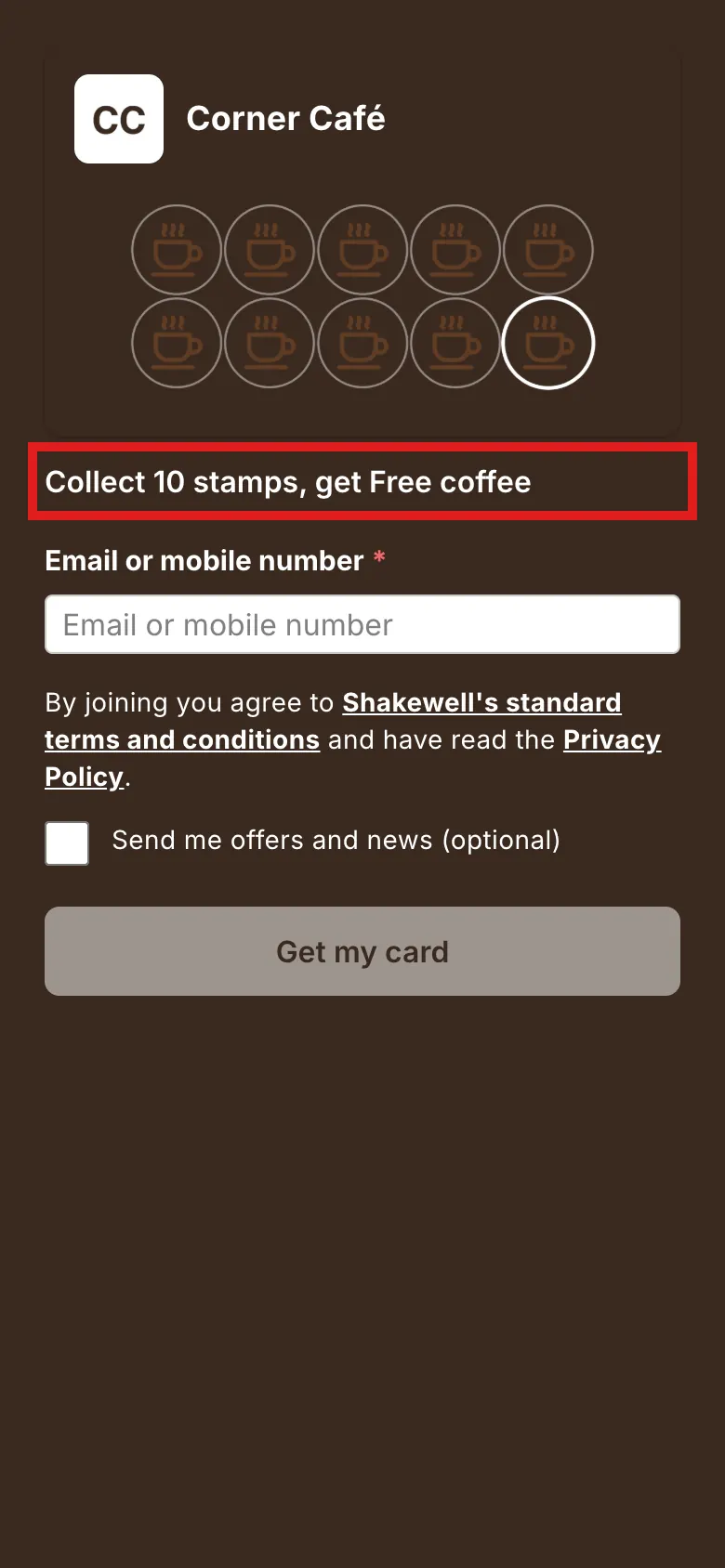
1. The sign-up page. The customer reaches a hosted page from a QR code at the counter or a link in an email. The page shows the card and the offer, and asks for an email address or mobile number. Marketing consent is a separate, optional tick box.
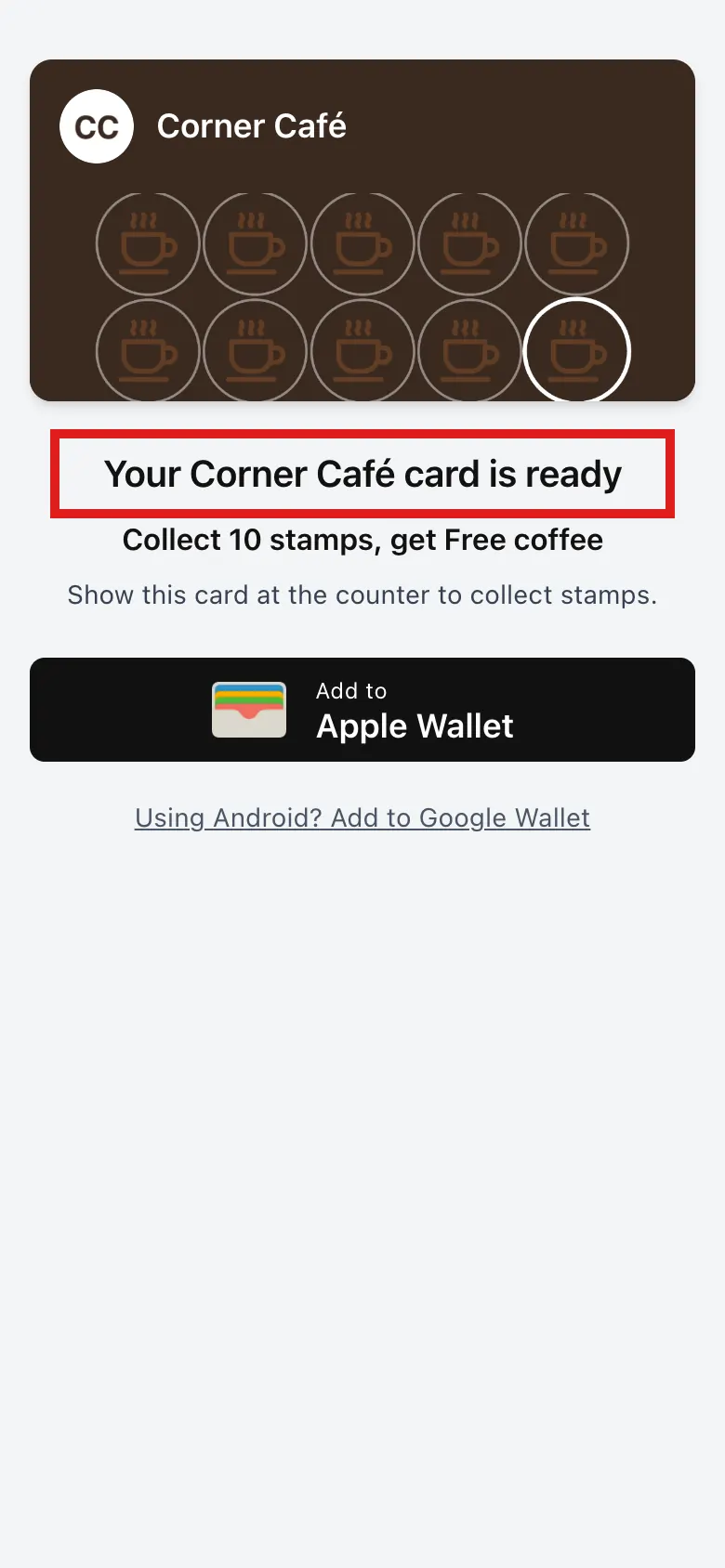
2. The card is ready. After one tap on “Get my card”, the customer sees the finished card and a button for their wallet. iPhone users get Add to Apple Wallet. Android users follow a link to add it to Google Wallet.
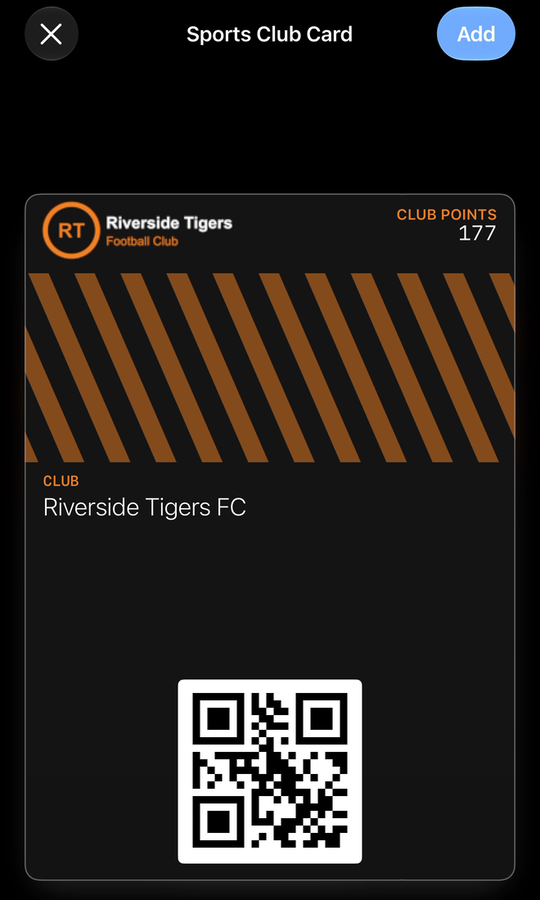
3. Add to the wallet. On an iPhone, Wallet shows a preview of the pass with an Add button. The example below is a club membership card with a points balance and a QR code for staff to scan.
Behind that tap, the platforms do different work. Apple’s documentation describes a pass as a signed bundle. A website can offer it as a download behind an Add to Apple Wallet button, an app can add it directly, or it can be attached to an email. Google’s save link is a URL of the form pay.google.com/gp/v/save/ followed by a signed JSON Web Token, and it can sit on a website, in an email or in an SMS.
What you can change after the card is issued
A pass is not frozen. Apple says you can update any type of pass and any information in it, except the authentication token and the serial number. Google’s classes and objects can be changed through its Wallet API.
In practice the things that change are:
- Points and stamps. A sale at the till adds points or a stamp, and the number on the card changes.
- Tier or status. A member moves from one tier to the next, or a membership renews.
- Offers and messages. A new offer replaces the old one, or a message is added to the pass.
- Branding and details. Opening hours, links and text on the back of the card.
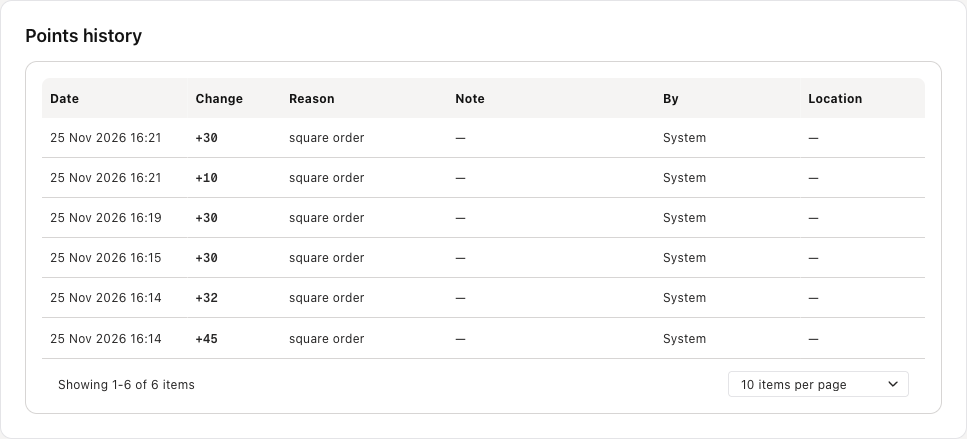
Each change is also written to a history on the customer’s profile, so staff can see why a balance moved. The view above shows six Square orders adding points.
How an update reaches the phone
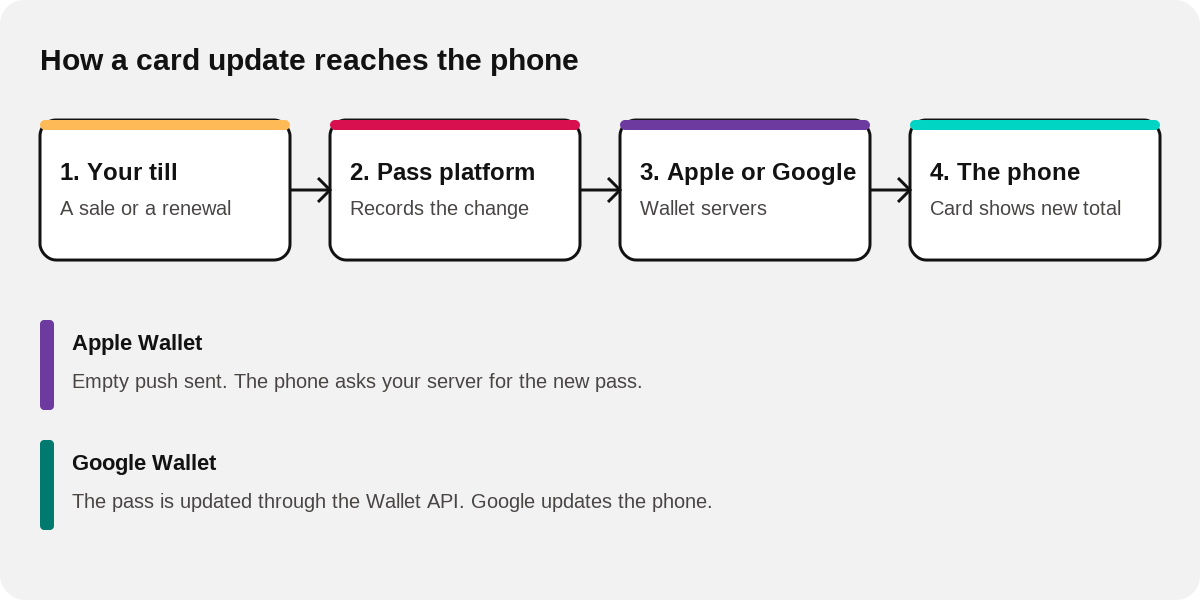
On Apple, the pass carries the address of a web service. When the customer adds the pass, their phone registers with that service. When something changes, the server sends a push through the Apple Push Notification service with an empty payload. The phone then asks the server which passes have changed and downloads the new version. That is why a platform needs a server running all the time, not just a file generator.
On Google, you update the pass object through the Google Wallet API, and Google takes care of getting the change to the devices that hold the pass.
What a wallet card cannot do
Wallet cards are good at being there when the customer opens their wallet and at showing a current balance. They are not a general-purpose messaging channel, and the platforms are firm about that.
| Question | Apple Wallet | Google Wallet |
|---|---|---|
| Can you force a notification? | No. An update shows an alert only when the changed field has a change message set on the pass. | Only for certain changes. Google allows a maximum of 3 notification-triggering messages and 3 notification-triggering updates in a 24-hour period. Over the limit returns an error, and customers must have notifications enabled to receive any. |
| Location triggers | A pass can list up to 10 locations. Wallet decides when to surface it, using the smaller of your distance or a default distance. | A class can list up to 10 merchant locations, and Google says users should get a notification when they are at one. Google sets the radius. |
| Needs an app? | No. | No. |
Apple also lets a pass set a relevant date, so Wallet can surface it around an event. The practical reading: treat location and time as a helpful nudge, not a guarantee, and plan for some customers never seeing a notification. If a use case depends on reaching every customer at a set moment, email or SMS is the better tool and the card is the thing the message points to.
A wallet card also cannot take orders, hold an account or manage a booking. It shows a card and a code. If the customer needs more than that, the card sits alongside an app or a web page rather than replacing it.
Wallet card, loyalty app or plastic card
| Wallet card | Loyalty app | Plastic card | |
|---|---|---|---|
| Customer installs something | No | Yes, from an app store | No, but collects a card |
| Balance can change after issue | Yes | Yes | Only by stamping or reprinting |
| Easy to lose | Lives in the phone’s wallet | Lives behind an app icon | Easily left at home |
| Notifications | Limited and controlled by Apple and Google | Wide, if the customer allows them | None |
| Accounts, ordering, booking | No | Yes | No |
| Staff scan it at the till | Yes, barcode or QR | Yes | Yes, if printed with a code |
| Works across the online store and shops | Yes, if the system behind it connects them | Yes | Only with a printed code and a system behind it |
| What you build and run | Passes and an update service, or a platform | An app, store listings, releases | Printing and stock |
A wallet card wins on friction. An app wins when you need accounts, ordering or rich messaging. We cover the choice for apps in more depth on our digital wallet passes page. Plastic only makes sense where printing costs and having no data on customers do not matter to you.
What running one involves
Whichever way you issue cards, the work falls into the same few jobs.
- Credentials. Apple passes are signed with a Pass Type ID certificate from an Apple Developer account, and Google needs an issuer account. Apple states that if the certificate expires you can no longer sign new passes or send updates to existing ones, although passes already installed keep working.
- A source of truth. One system has to own the customer and the balance. If points come from a till, a web shop and a membership system, decide which one wins when they disagree.
- Events. Sales, refunds, renewals and tier changes each need to change the card. Refunds are the ones that get missed.
- Staff. The counter team need a way to scan a card and a short guide for what to do when a phone is flat.
- Privacy. You are collecting an email address or mobile number, and consent for marketing should be a choice, not a default.
Where Shakewell Wallet fits
Shakewell Wallet is our own product, so weigh this section accordingly. It is a platform for designing, distributing and updating loyalty, stamp, membership and event passes for Apple Wallet and Google Wallet.
You design a card in a visual builder that previews both wallets, share it through a QR code or link, and update issued passes as stamps, points and offers change in your system. Passes are signed with Shakewell Wallet’s own Apple certificate, so you do not need an Apple Developer account. Shopify POS and Square connect directly, other connectors are listed on the integrations page, and there is a REST API and signed webhooks for anything else. Our integrations page lists what connects and the release status of each connector, and the product page covers the rest. Current plans are on the pricing page.
If the card has to follow a point of sale or ERP that has no ready connector, the team that builds Wallet does that integration. If you would rather issue passes from your own system, we also build them into custom applications, covered in digital wallet passes and our custom software development work.
Sources: Apple Wallet pass reference, Adding a web service to update passes, Distributing and updating a pass, Apple certificates overview, Google Wallet loyalty push notifications, Issuing Google Wallet passes for web, email and SMS, Google Wallet loyaltyclass reference and Shakewell Wallet, checked 29 November 2026.
Common questions
Do customers need to download an app for a digital loyalty card?
No. The card is a pass that goes into the Apple Wallet or Google Wallet already on the phone. The customer taps an Add to Apple Wallet button or an Add to Google Wallet link, and the card is there. There is nothing to install or sign in to.
Can a wallet loyalty card send push notifications?
Yes, within limits set by Apple and Google. Apple shows an alert when a pass field that has a change message is updated. Google's loyalty documentation allows a maximum of three notification-triggering messages and three notification-triggering updates in a 24-hour period, and customers must have notifications enabled.
Can a digital stamp card work without a till integration?
It can, if staff can add a stamp another way. In Shakewell Wallet, staff scan the card on a scan page that needs no extra hardware and the stamp is added. A till connection such as Shopify POS or Square adds the stamp or points automatically from the sale.
What is the difference between an Apple Wallet and a Google Wallet loyalty card?
They are two formats for the same idea. Apple calls it a store card and signs each pass as a file. Google splits a card into a class for the programme and an object for each member. A good platform issues both from one design, so you do not build the card twice.
How much does a digital loyalty card cost to run?
It depends on the platform and how many active cards you have. Shakewell Wallet publishes its current plans on its pricing page, so we do not repeat them here.