
Drupal Upgrade Status Module: How to Run It and Read the Report
Shakewell ·

Upgrade Status is the first thing to run before any Drupal major upgrade. It tells you what stands between the current site and the next version, in a form you can scope work from. This post covers installing it, running it from the admin UI and from Drush, what each part of the report means, how it fits with Drupal Rector and the Project Update Bot, and where it stops being useful. It applies to the Drupal 10 to 11 move and the Drupal 11 to 12 move alike, and we checked it against the module’s drupal.org pages on 29 November 2026.
What Upgrade Status is
Drupal.org describes the module as a check of a site’s readiness for the next major version. It looks at modules, themes, profiles and recipes, including ones that are not installed. It runs on your own server and needs no API key, and your code is not sent to a remote service.
Two things follow from how it works:
- It runs on the current site. The module’s page says you must run compatibility checks on your current site against the next major version. A Drupal 10 site is checked for Drupal 11, and an 11 site for 12.
- Most checks cannot run afterwards. Once you have upgraded, the deprecated APIs it looks for are gone, so run it before you change core, not after.
It does not support jumping several majors at once. A Drupal 9 site is checked for 10 first.
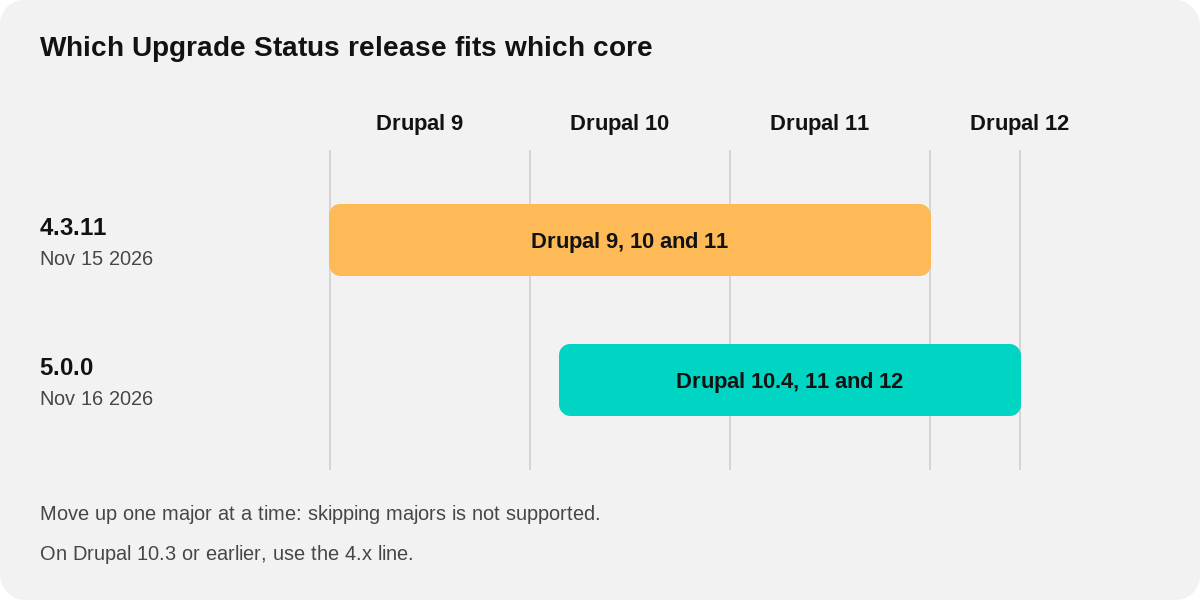
Which version of the module to use
Drupal.org lists two lines:
| Module version | Released | Works with | Use it for |
|---|---|---|---|
| 5.0.0 | 16 November 2026 | Drupal 10.4, 11 and 12 | Drupal 10.4 to 11, and Drupal 11 to 12 |
| 4.3.11 | 15 November 2026 | Drupal 9, 10 and 11 | Sites on Drupal 10.3 or earlier, or on 9 |
The release notes for 5.0.0 say it triples the kinds of deprecations detected and speeds up analysis and reporting. Because 5.0.0 lists Drupal 10.4 as its minimum, a site on 10.3 or earlier uses the 4.x line. The Drupal 11 upgrade guide requires 10.3 or later before the move. Our Drupal 10 to 11 upgrade post covers that path and the 9 December 2026 end of life for Drupal 10. For the 11 to 12 case, our Drupal 12 release date and requirements post covers PHP, database and the modules leaving core.
Install it with Composer
The module needs Composer because it depends on third-party PHP libraries. The drupal.org page shows:
composer require drupal/upgrade_statusAdding --dev keeps it out of a production build if you deploy with composer install --no-dev. The project page does not require that, so treat it as a choice. Two practical points:
- To analyse your test classes, also install Drupal’s developer dependencies (
drupal/core-dev). - Optionally install Composer Deploy or Git Deploy. The module uses them to separate custom projects from contributed ones more accurately.
Enable the module from the Extend page, or with Drush. It has no configuration form. Optional settings, such as the PHP binary used for analysis, go in settings.php.
Run the scan from the admin UI
Open Administration, then Reports, then Upgrade status. The page opens with a note on the accuracy of the results, a summary and the environment checks. Below those, projects are listed by what to do with them. The UI suits a first look and a conversation with a non-developer. For repeat runs, a CI job, or a report you want to keep as a file, use Drush.
Run it from Drush
The module’s README documents two commands, for Drush 13 and later:
drush upgrade-status:analyze --all
drush upgrade-status:report
On Drupal 11.4 and later use vendor/bin/dr in place of drush. The README says Drush 15 has no drush command, so use vendor/bin/dr there too. The short aliases are us-a and us-r.
Options worth knowing:
| Option | What it does |
|---|---|
--all |
Analyse every project |
--skip-existing |
Reuse stored results |
--ignore-contrib, --ignore-custom, --ignore-uninstalled |
Leave out a type of project |
--ignore-list=a,b |
Leave out named projects |
--phpstan-memory-limit=2G |
Raise the analyser’s memory (default 1500M) |
--format= |
plain (Markdown), html, csv, checkstyle or codeclimate |
The report command takes --groups to select sections, for example --groups=environment,update, and --format for Markdown, HTML or CSV.
The analyze command exits with code 3 when a project has messages for the next major version or its analysis failed, and with 0 otherwise. Messages that only apply to a later major version still give 0. That makes it usable as a CI gate: run it on a branch, fail the job on 3, and watch the count fall.
How to read the report
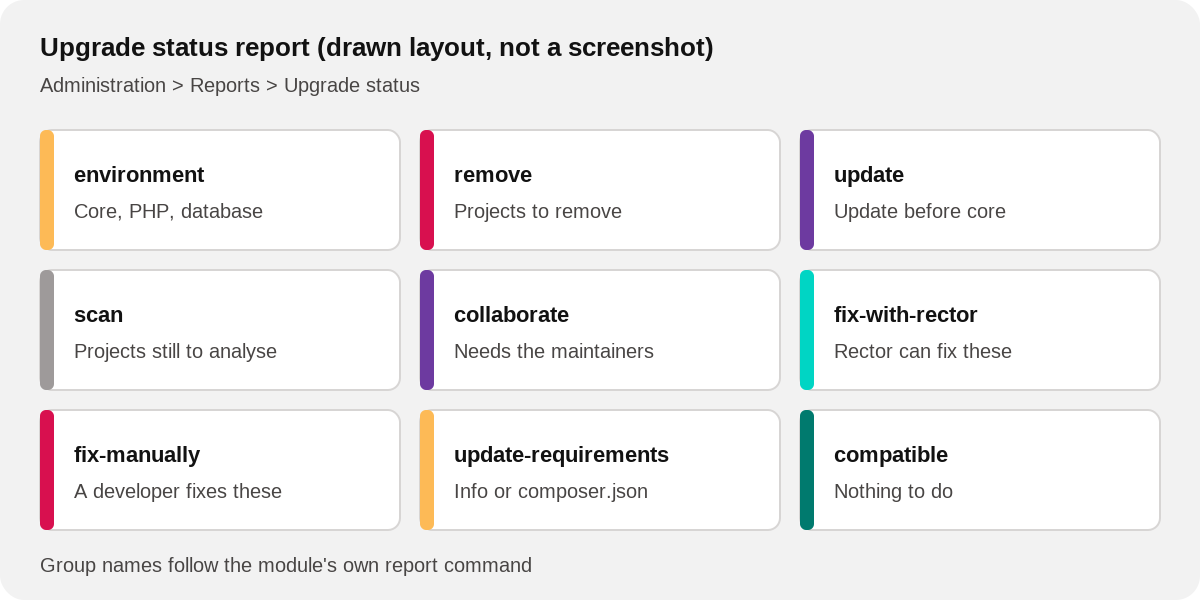
The report is organised by next step. The report command’s --groups option lists the sections, and the table below follows those names.
| Group | What it means | Who usually acts |
|---|---|---|
environment |
Whether your core version supports an upgrade and whether the server meets the next major’s requirements | Infrastructure |
remove |
Projects to remove | Site owner |
update |
Projects to update on the current site before the core upgrade | Developer |
scan |
Projects not yet analysed | Whoever ran the scan |
collaborate |
Projects that need work from their maintainers | Developer, via the issue queue |
fix-with-rector |
Problems Drupal Rector can fix automatically | Developer |
fix-manually |
Problems that need a manual fix | Developer |
update-requirements |
Info file, composer.json or recipe requirements to update once the code is compatible |
Developer |
compatible |
Nothing to do | Nobody |
Each problem inside a project also carries a category, and the categories matter when you estimate:
| Category | Meaning |
|---|---|
| Fix now with rector | Removed in the next major version, and drupal-rector can fix it |
| Fix now manually | Removed in the next major version, with no drupal-rector fix yet |
| Update requirements | An info file, composer.json or recipe requirement is incompatible with the next version |
| Consider contrib deprecations | A deprecated API of a contributed module or theme, removed in a later release of that project |
| Check manually | No specific Drupal version, such as a parse error |
| Raise core requirement and fix | A contributed project’s fix needs a newer core than its oldest supported one |
| Update core and fix | A custom project’s fix does not yet work on your current core |
| After Drupal 12 | Removed in a later version, so no fix is needed for Drupal 12 |
The first two are the work you must do now. Read “Check manually” early: the README says it covers messages such as a parse error or code that could not be checked, so treat those files as not fully analysed.
How it fits with Rector and the Project Update Bot
The three tools split the job. Upgrade Status finds problems. Drupal Rector applies automated fixes. The Project Update Bot does that for contributed projects at scale.
- Drupal Rector rewrites deprecated code. Drupal.org’s guide says to use it with Upgrade Status. A drupal.org post from July 2026 describes composer-based sets, installed with
composer require --dev palantirnet/drupal-rector:^1.0and run withvendor/bin/rector process. It selects rules from your installed core version and is described as a beta, so review the diff on your custom code before you accept it. - Project Update Bot scans contributed projects and opens issues with patches for deprecated API uses. A June 2026 drupal.org post says its Rector rules now cover more than 80% of the deprecated API uses introduced in the Drupal 12 cycle. That is rule coverage, not the share of all contributed code already fixed. If a module is in your
collaborategroup, look at its issue queue for a bot issue before you plan a fork. - Composer’s lenient endpoint helps with modules that work on the next major but have not yet declared it. The Drupal 11 guide recommends it for modules that need patches.
Turn the report into an estimate
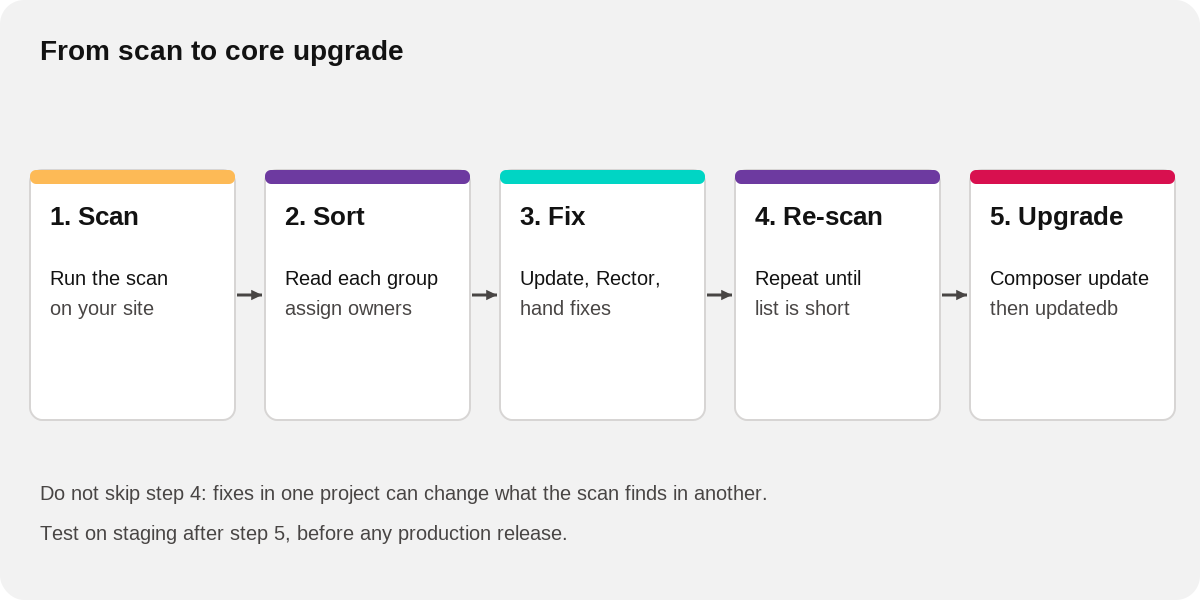
A report is a list, and an estimate needs sizes and owners. This is how we use the groups.
- Environment. Count the server changes: PHP, database, extensions. These can start before any Drupal work.
- Contributed modules. For each project in
update,collaborateorremove, record one of four outcomes: a release exists, a patch exists in the issue queue, replace it, or drop the feature. Replace and drop are decisions for the business, not only developer tasks. - Custom code. Count files and projects in
fix-with-rectorandfix-manually. Rector clears the mechanical changes. Hand fixes grow with age and with how deeply the code reaches into core internals. - Themes and front end. Upgrade Status does not tell you how a page looks after the upgrade, so allow compare-and-fix time on its own line.
- Testing. Scale it to the number of integrations, such as search, single sign-on, payments and CRM, not to the module count.
Re-run the scan after each fix batch. The counts per group, falling over time, also make a simple progress report for a steering group.
Where it stops
Upgrade Status is static analysis, and a clean report does not mean a clean upgrade.
- It does not run the site. It finds code that calls removed APIs. It does not find a template that renders differently, or a query that behaves differently on a new database version.
- Third-party code is judged by its declarations. A module can pass and still misbehave.
- It will not skip majors. Plan the sequence, such as 10 to 11 and then 11 to 12.
- It needs a working codebase. The module installs with Composer, so a site that cannot run Composer cleanly cannot be scanned, and that is itself a finding.
- It checks Twig templates and JavaScript for deprecated APIs, but static analysis cannot show how a template renders, so test the front end separately.
If the report is long and the decisions are unclear, that may be a sign the site needs more than a version bump. Our framework upgrades work starts with exactly this kind of readiness read, and our project rescue page covers sites where the code has become hard to change.
Sources: Upgrade Status project page, Upgrade Status README, How to upgrade from Drupal 10 to Drupal 11, Drupal core release schedule, Drupal Rector project page, Rector composer-based sets post and Project Update Bot post, checked 29 November 2026.
Common questions
What does the Drupal Upgrade Status module do?
It checks a site's readiness for the next major Drupal version. It reviews your environment, your contributed modules and themes, and your custom code, then groups every project by the next step to take. It runs locally and does not send your code to a remote service.
Does Upgrade Status support Drupal 12?
Yes. Drupal.org lists version 5.0.0, released 16 November 2026, as working with Drupal 10.4, 11 and 12. Run it on Drupal 11 to prepare for 12. It does not support skipping a major version, so a Drupal 10 site is checked for Drupal 11 first.
How do I run Upgrade Status from the command line?
With Drush 13 or later, run drush upgrade-status:analyze --all to scan, then drush upgrade-status:report to print the report. On Drupal 11.4 and later you can use vendor/bin/dr instead of drush. The analyze command exits with code 3 when it finds problems for the next major version, so a CI job can fail on it.
Can Upgrade Status fix the problems it finds?
No. It reports problems and marks which ones Drupal Rector can fix automatically. Rector applies those fixes to custom code, and for contributed modules the Project Update Bot opens issues with patches. Everything else needs a developer or a decision from the business.
Should we leave Upgrade Status installed after the upgrade?
Not necessarily. The Drupal upgrade guide says that once compatibility is confirmed you may uninstall and remove it. Most of its checks cannot run after the upgrade anyway, because the deprecated code they look for is gone. Install it again on the new version when you start preparing for the next major.