
Headless WordPress with Next.js: Four Plugins That Fit Together
Shakewell ·
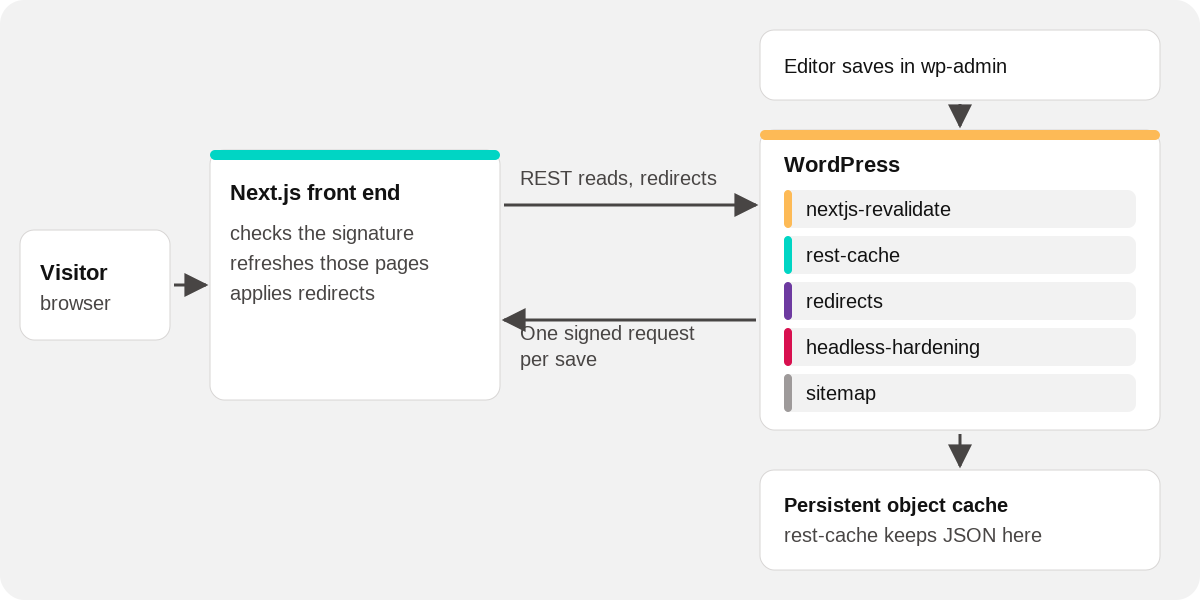
Choosing headless WordPress is one decision. Living with it is four more. The front end serves stale pages until something tells it content changed. The REST API rebuilds the same JSON for every request. Redirects that used to live in WordPress need a new home. And WordPress is still sitting on its own hostname, answering anyone who asks.
We wrote one small plugin for each of those four problems. This post explains what each one does, how they fit into a single publish flow, and where each stops. Whether headless suits you at all is a separate question, and we cover it in Next.js headless: when it is worth it and headless CMS: when it is worth it. The full list of our plugins is on the open-source WordPress plugins index.
All four are public on GitHub under GPLv2 or later and are early releases. They need WordPress 6.5 or later and PHP 8.1 or later, and they are installed from a GitHub release zip, not from wordpress.org.
The four problems at a glance
| Problem | Plugin | Version | How it is configured | What it deliberately leaves alone |
|---|---|---|---|---|
| Front end shows stale pages | shakewell-nextjs-revalidate | 0.1.0 | Constants or environment variables; no settings page | Sends no post content, no personal data and never the secret |
| REST API rebuilds the same JSON | shakewell-rest-cache | 0.2.0 | Constants or environment variables; you choose the routes | Never caches signed-in users, errors or any method but GET |
| Redirects need a home | shakewell-redirects | 0.1.1 | Tools > Redirects, CSV import and export | A prefix rule does not keep the rest of the path |
| WordPress is exposed on its own host | shakewell-headless-hardening | 0.2.0 | One constant or filter per module | Stores nothing and adds no admin screen |
A fifth plugin, shakewell-sitemap (0.1.1), covers the sitemap and is covered at the end.
1. Revalidation: telling Next.js what changed
Next.js can refresh cached pages on demand. Its documentation describes on-demand revalidation as explicitly invalidating cached content by calling revalidateTag() or revalidatePath(), with the next request to that content triggering a fresh render. What it does not do is know when WordPress content changed. Something has to tell it.
shakewell-nextjs-revalidate is that something. When an editor publishes, updates, unpublishes, trashes or deletes content, or changes a menu, a site setting, a term or a media item, the plugin works out which pages are affected and sends the front end one signed request. One request covers the whole PHP request, however many things changed. Over a configurable limit (100 by default) it sends “refresh everything” instead.
It is off until you set an https endpoint and a secret of at least 32 characters:
define( 'SHAKEWELL_NEXTJS_REVALIDATE_URL', 'https://frontend.example/api/revalidate' );
define( 'SHAKEWELL_NEXTJS_REVALIDATE_SECRET', 'a-random-secret-of-at-least-32-characters' );
The body is JSON with a scope. A page change looks like {"scope":"page","paths":["/books/a/","/books/"],"items":["path:/books/a/"],"types":["book"]}: the item’s own address, the listings of its type, and the names of what changed. Other scopes cover items, types, menus alone and everything. The request carries x-revalidate-timestamp, x-revalidate-event and x-revalidate-signature headers. The signature is an HMAC-SHA256 keyed with the secret and including the environment, so a staging message cannot be replayed on production.
Three details matter in practice:
- Your handler verifies it. The readme is explicit that the front end must check the signature and that the timestamp is recent. The plugin does not ship the Next.js side.
- It never blocks the save. The request is sent after the editor’s response is finished when PHP-FPM allows. An uncertain result (no answer, a server error or a rate limit) is retried up to three times through wp-cron with the same event id and body, so your handler can treat it as a repeat. If the front end is down, the save is unaffected and the front end’s own cache expiry is the fallback.
- You tell it where lists appear. WordPress cannot know that a book also shows on
/books/. TheLISTINGSsetting maps a post type to the pages it also appears on, for example{"book":["/books/"]}. Settings such asRELATED,MENU_TYPESandOPTION_EFFECTScover related posts, menus and ACF options pages.
Set SKIP_USER_AGENT to your front end’s own User-Agent so its REST reads can never trigger a send and cause a loop. One caveat is Next.js’s, not the plugin’s: the documentation says that with several instances behind a load balancer, revalidation events are local by default, so a call that reaches instance A invalidates only that instance. Plan a shared cache handler if you run more than one.
2. REST caching: stop rebuilding the same JSON
A headless front end asks WordPress for the same routes constantly. shakewell-rest-cache stores the finished response of the routes you list in the persistent object cache, so a repeat request is one cache read. Nothing is built in: until you set SHAKEWELL_REST_CACHE_ROUTES, nothing is cached.
define( 'SHAKEWELL_REST_CACHE_ROUTES', array( '/shop/v1/menu', '/shop/v1/(books|authors)' ) );The safety rules are strict, and they are the reason to read the readme before adopting it:
- Anonymous GET only. Signed-in visitors, requests with an Authorization header, login and password cookies and every other method are never served from the cache and never stored.
- Needs a persistent object cache (Redis, Memcached or similar). Without one the plugin registers nothing and changes nothing.
- Listed parameters only. A request with a parameter you did not list, or a value that is not a plain slug or number, bypasses the cache, so random parameters cannot fill it. A route that takes free text, such as search, is therefore never cached.
- Headers survive. A stored answer keeps the original’s response headers, such as the WordPress pagination totals and
Link, and embedded objects when the request asked for_embedand listed it as a parameter.
When an editor changes content, a term, a menu, an attachment or a listed option, every stored answer is retired at the end of the request, after the whole save. Version 0.2.0 added stale-while-rebuild: one request rebuilds under a short lock while the others are served the previous answer, so a burst after a save does not stampede PHP. The previous answer is kept for a limited time and never for content that stopped being public. If you need the new content on the first read, max_stale set to 0 turns stale serving off.
wp shakewell-rest-cache warm fills the cache one request at a time, and flush retires everything with nothing served stale, which is the command to run on release.
3. Redirects: one list, two places to serve it
Changing URLs costs search ranking, so shakewell-redirects makes accidental changes hard. Editors manage redirects under Tools > Redirects, each with a source path, a target, a status code (301, 302, 307 or 308), a match type (exact or prefix) and an enabled switch. They are stored as a non-public post type, so there are no custom tables.
On every save it refuses a source that is not a path, a target that is not a site path or http(s) URL, a redirect to itself, a loop or double hop through another enabled redirect, and a duplicate. It warns when the source is the URL of a published page. Import is all or nothing: if any CSV row is invalid, nothing is imported and each problem is listed by line number.
For headless, there are two options. WordPress can keep redirecting, which only helps if visitors reach WordPress. Or the front end can read the list and do it itself. Turn WordPress redirecting off with define( 'SHAKEWELL_REDIRECTS_DISABLE', true ); and read the public, read-only list at GET /wp-json/shakewell-redirects/v1/redirects. The route is registered whenever the plugin is active, including when WordPress redirecting is switched off, so anyone can read your redirect list. It returns enabled, published redirects only, with an ETag, Cache-Control: public, max-age=60, stale-while-revalidate=300 and a 304 for a matching If-None-Match. The shakewell_redirects_changed action fires when redirects change, so you can purge or revalidate your front-end copy.
4. Hardening: WordPress is still on the internet
With a separate front end, WordPress usually sits on its own hostname, and anything it answers is public. shakewell-headless-hardening closes the common exposures one module at a time, each with its own switch:
- ACF lockdown (on by default) refuses the
acfREST namespace to non-staff and blanks password, secret, API key and token fields in anonymous responses. - REST boundaries (on by default) restricts the users and co-authors routes to staff, plus any namespace you list, and returns 404 on author archives.
- XML-RPC off (on by default) ends every XML-RPC request.
- Gravity Forms API v1 off and Gravity Forms addresses are off by default and need Gravity Forms.
- No index on chosen hosts does nothing until you list hostnames, then sends noindex, a robots meta tag and a disallow-all robots.txt on those hosts only.
The trade-off is stated in the readme: anonymous clients lose the users and co-authors routes and the acf namespace unless you add a route prefix to the shakewell_headless_hardening_public_routes filter. This is hardening for one class of exposure. The wider checklist is in our WordPress hardening checklist.
How they fit in one publish flow
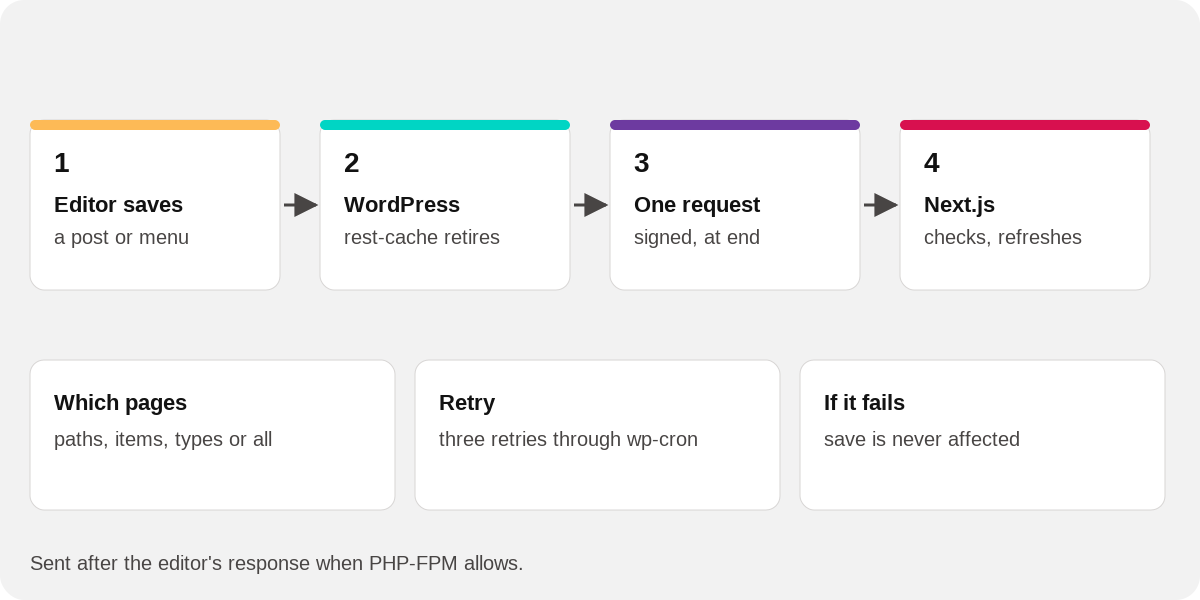
- An editor saves a post. WordPress writes it as normal.
- At the end of the request, rest-cache retires its stored answers, and nextjs-revalidate works out the affected paths, items and types.
- One signed request goes to the front end, after the response when PHP-FPM allows, with retries through wp-cron if the result is uncertain.
- The front end verifies the signature and timestamp, refreshes those pages and fetches fresh JSON from WordPress.
- Redirects and hardening are not part of that loop. They apply on every request, and
shakewell_redirects_changedis the hook if you want a redirect change to refresh your front-end copy.
Where the sitemap fits
shakewell-sitemap serves /sitemap.xml and one sitemap per post type or taxonomy you choose. For headless sites, SHAKEWELL_SITEMAP_PUBLIC_URL replaces the WordPress address at the start of every URL, so each <loc> shows the host visitors use. Serve the files from the front end by proxying them from WordPress, or point search engines at the WordPress address. It switches off WordPress’s built-in wp-sitemap.xml by default so search engines see one sitemap, and it deliberately adds no images or alternate languages and does not write a robots.txt line.
What we would check before adopting them
- The front end handler for revalidation exists, verifies the signature and is tested, including the retry case.
- A persistent object cache is running, or rest-cache will do nothing.
- Your
LISTINGSmap matches where content really appears. - Staging has its own secret and environment label.
If you want help with the build around them, see our Next.js development and WordPress development work.
Sources: the readme.txt and README.md of each plugin repository, read on 29 November 2026; the Next.js documentation on revalidating and how revalidation works, and the WordPress REST API handbook on pagination and linking and embedding, checked the same day. Next.js is a trademark of Vercel, Inc. These plugins are not affiliated with, endorsed by or sponsored by Vercel.
Common questions
How do I revalidate a Next.js page when WordPress content changes?
Have WordPress send your front end a signed request when content is saved, and have a route handler on the front end verify it and refresh the affected pages. Our shakewell-nextjs-revalidate plugin sends that request, one per save, with the paths, items and content types that changed. The front end handler is yours to write, and it must check the signature and the timestamp.
Can the WordPress REST API be cached?
Yes, with a persistent object cache such as Redis or Memcached. shakewell-rest-cache stores the finished JSON of the routes you list and retires it when content changes. It only caches anonymous GET requests, and with no persistent object cache it does nothing.
Should redirects live in WordPress or in Next.js?
Either works. shakewell-redirects lets editors manage them in wp-admin, and it can serve them on WordPress and it always publishes them as a public read-only REST list, so the Next.js front end does the redirecting. Turn WordPress redirecting off with one constant if the front end owns them.
Do I need to lock down WordPress if visitors only see Next.js?
Yes. WordPress still answers on its own hostname, including the REST API. shakewell-headless-hardening closes the common exposures: the users route, ACF secrets, XML-RPC, and optionally the legacy Gravity Forms API, and it can send noindex on the WordPress hostname.
Are these plugins production-ready?
They are early 0.x releases: revalidate 0.1.0, rest-cache 0.2.0, redirects 0.1.1 and headless-hardening 0.2.0. Each readme lists what it does and does not do. Test them on staging with your own front end before you rely on them.