
Our Open-Source WordPress Plugins
Shakewell ·

We have published eighteen small, single-purpose WordPress plugins. They are public on GitHub, licensed GPLv2 or later. One, shakewell-relationship-sync, is also in the WordPress.org plugin directory; the rest are installed from GitHub. All of them are early releases: every version number starts with 0.
This page is the index, and shakewell.agency/open-source is the short list. It says why we write plugins this way, lists all eighteen by purpose with the version and requirements, and explains how to install one from GitHub and how to report a problem. Three of the groups have a longer write-up: headless WordPress with Next.js, single sign-on with Microsoft Entra ID and WordPress on AWS without stored keys.
Why we write small, single-purpose plugins
We run WordPress platforms for clients, and some jobs recur on them: redirect a URL, keep a cache honest, sign editors in with the company account, send mail through the infrastructure the client already pays for. A large all-in-one plugin can do each of these, but it brings every other feature along, and each feature is more code to update and more surface to attack.
The repository template every plugin starts from sets the rules. In its own words, a plugin is small and single-purpose, “Fewer lines means less to attack and less to break”. The rules that matter to a site owner are these:
- Generic. Anything site-specific is a setting, a constant or a filter, never a value in code, and no client content goes into the code, tests or readmes.
- No paid dependencies where they can be avoided. A plugin that extends ACF or Gravity Forms says so in its readme.
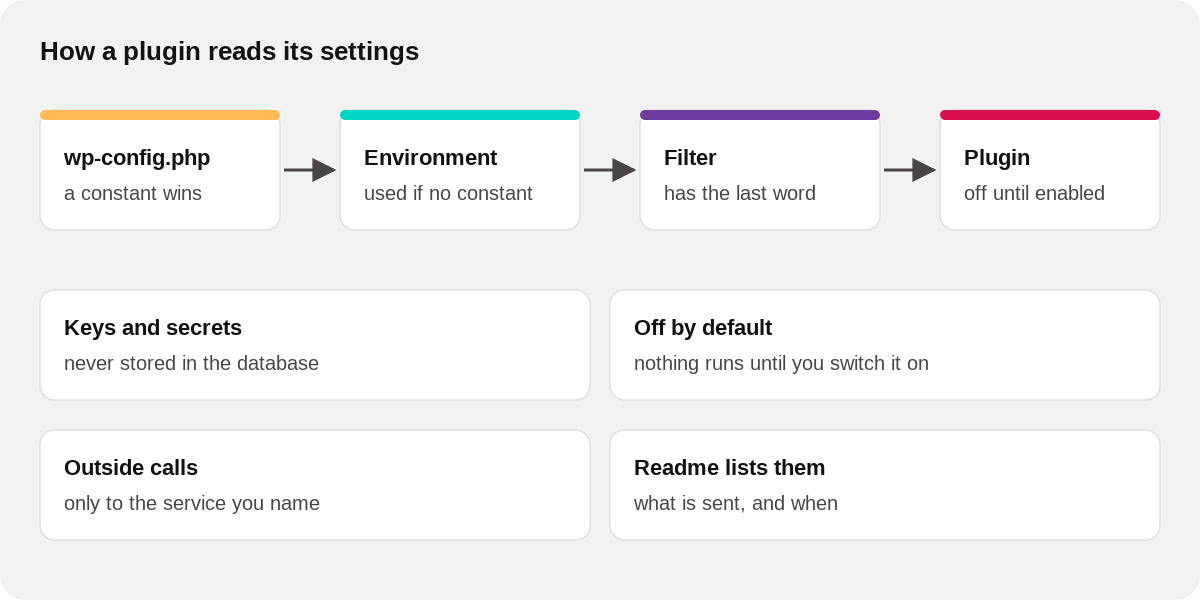
- Nothing remote by default. No telemetry, no calls home, no updater of its own. A call to an outside service stays off until an administrator opts in, and the readme lists it under External services with what is sent and when.
- Security basics on every action: a capability check, a nonce check, sanitised input, escaped output, prepared SQL, and no secrets in options or logs.
- No nagging. No upsells or forced credits, and a notice appears only where the plugin needs attention.
This does not make a plugin better than a mature product for every site. It makes the trade-offs easy to read: each readme has a “what it deliberately does not do” statement, and you can read the whole plugin in an afternoon.
One configuration pattern
Most of the plugins have no settings screen for anything sensitive. Settings are PHP constants in wp-config.php or environment variables, with a filter at the end for code that needs the last word. Keys and secrets never go in the database. That suits sites where configuration lives in version control, and it keeps security-relevant settings out of reach of anyone who can only log in to wp-admin.
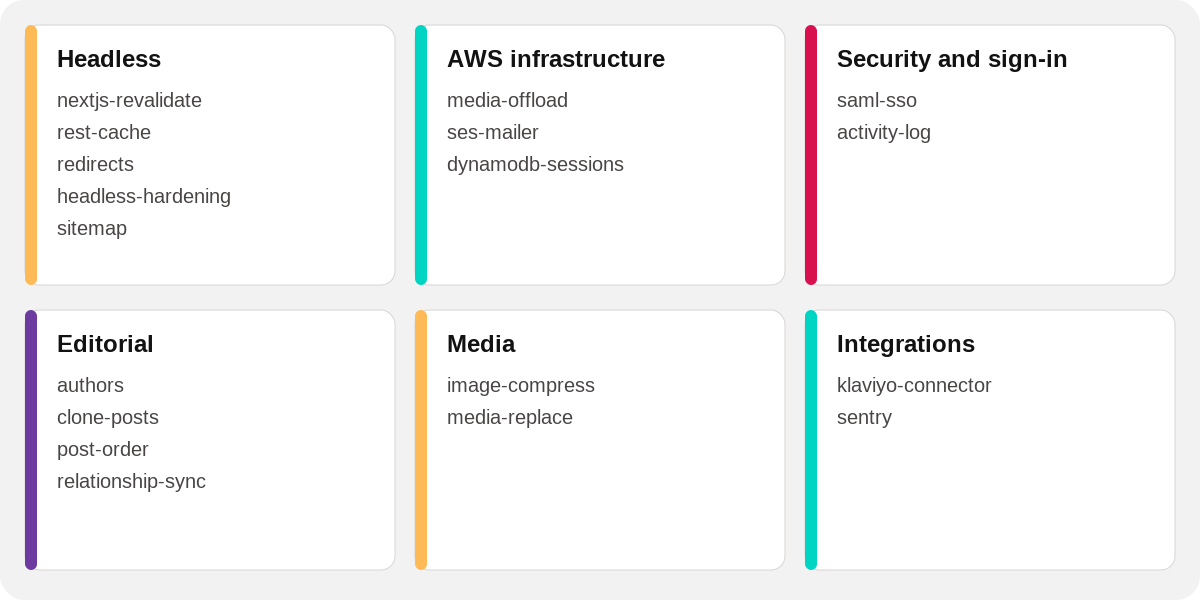
The eighteen at a glance
Every plugin requires PHP 8.1 or later and WordPress 6.5 or later, except the three marked 6.8. All list “Tested up to” 7.1 in their readmes. Versions are taken from each plugin’s header.
| Plugin | Version | Group | Also needs |
|---|---|---|---|
| shakewell-nextjs-revalidate | 0.1.0 | Headless | A Next.js front end that verifies the signature |
| shakewell-rest-cache | 0.2.0 | Headless | A persistent object cache (Redis, Memcached or similar) |
| shakewell-redirects | 0.1.1 | Headless | Nothing |
| shakewell-headless-hardening | 0.2.0 | Headless | Nothing (two modules need Gravity Forms) |
| shakewell-sitemap | 0.1.1 | Headless | Permalinks other than Plain |
| shakewell-media-offload | 0.1.1 (WP 6.8) | AWS | An S3 bucket and AWS credentials on the server |
| shakewell-ses-mailer | 0.1.1 (WP 6.8) | AWS | Amazon SES and AWS credentials on the server |
| shakewell-dynamodb-sessions | 0.1.0 | AWS | A DynamoDB table and the PHP curl extension |
| shakewell-saml-sso | 0.1.1 | Security | A SAML 2.0 identity provider; PHP openssl, dom and xml |
| shakewell-activity-log | 0.1.1 | Security | Nothing |
| shakewell-authors | 0.2.0 | Editorial | Nothing |
| shakewell-clone-posts | 0.1.1 | Editorial | Nothing |
| shakewell-post-order | 0.3.0 | Editorial | Nothing |
| shakewell-relationship-sync | 0.1.1 | Editorial | Advanced Custom Fields, free or Pro |
| shakewell-image-compress | 0.2.0 (WP 6.8) | Media | Nothing |
| shakewell-media-replace | 0.1.0 | Media | Nothing |
| shakewell-klaviyo-connector | 0.1.3 | Integrations | Gravity Forms and a Klaviyo account |
| shakewell-sentry | 0.2.0 | Integrations | A Sentry project (hosted or self-hosted) |
Headless
For sites that use WordPress as a content store behind a separate front end. They work together, and the headless write-up shows how.
- shakewell-nextjs-revalidate (0.1.0). When content, a menu, a term or a media item changes, it works out which pages are affected and sends the front end one signed request. It does nothing until an https endpoint and a secret of at least 32 characters are set.
- shakewell-rest-cache (0.2.0). Keeps the finished JSON of the REST routes you list in the object cache and retires it when content changes. Without a persistent object cache it registers nothing.
- shakewell-redirects (0.1.1). Manages 301, 302, 307 and 308 redirects under Tools > Redirects, refuses loops and bad targets on save, and always exposes the enabled redirects as a public read-only REST list, so a headless front end can do the redirecting.
- shakewell-headless-hardening (0.2.0). Switchable modules that close common exposures on the WordPress hostname: REST user lists, ACF secrets, XML-RPC, the legacy Gravity Forms API, and noindex on hosts you name.
- shakewell-sitemap (0.1.1). Serves
/sitemap.xmland one sitemap per post type or taxonomy you choose, with an option to publish a different public host. It leaves out images and alternate languages on purpose.
AWS infrastructure
For sites on AWS where the server already has an identity. These use the instance profile or task role instead of a stored key, and the AWS write-up covers the IAM policies. If you run WordPress on AWS with us, our AWS partner page has the wider picture.
- shakewell-media-offload (0.1.1, WordPress 6.8). Copies uploads to an S3 bucket and rewrites their addresses to S3 or CloudFront. It reads the tables of another offload plugin so existing media addresses do not change, and ships
urlsandcompareWP-CLI commands to prove it. - shakewell-ses-mailer (0.1.1, WordPress 6.8). Sends
wp_mail()through the Amazon SES v2 API in one signed request. No email log, no queue and no retry. - shakewell-dynamodb-sessions (0.1.0). Stores PHP sessions in a DynamoDB table so servers behind a load balancer share them. It loads as a must-use plugin and falls back to PHP’s own handler if DynamoDB fails.
Security and sign-in
- shakewell-saml-sso (0.1.1). Adds a single sign-on button to wp-login.php for Microsoft Entra ID or any SAML 2.0 identity provider. It never replaces the normal login form, which stays as the emergency way in. The Entra ID guide walks through setup.
- shakewell-activity-log (0.1.1). Records who changed what: content, logins, user and role changes, plugin and theme changes and a short list of core settings. Nothing in the admin can edit or delete an entry, and entries older than 365 days are removed by default. It can also copy every entry to the PHP error log for a log shipper. For the wider checklist, see our WordPress hardening checklist.
Editorial
- shakewell-authors (0.2.0). Gives a post more than one author, in order, using users or private author profiles, and imports from Co-Authors Plus. It does not change the post’s normal author or add author archives.
- shakewell-clone-posts (0.1.1). Copies any post, page or custom post type to a new draft, including terms and custom fields. The copy has no slug and is always a draft.
- shakewell-post-order (0.3.0). Drag-and-drop ordering on admin list screens, with Move up and Move down buttons for keyboard and screen reader use. The order is saved to the built-in
menu_orderfield. - shakewell-relationship-sync (0.1.1). When an ACF relationship or post object field links one post to another, the other post links back, and unlinking removes it. You declare the field pairs with a filter. It is also on WordPress.org.
Media
- shakewell-image-compress (0.2.0, WordPress 6.8). Re-encodes JPEGs saved at near-maximum quality on upload, keeping the upload as the original, and re-encodes the heaviest existing JPEGs from WP-CLI. The bulk command is a dry run unless you pass
--apply, andrevertundoes a finished one. - shakewell-media-replace (0.1.0). Replaces a media library file with a new upload while keeping the attachment ID and address. The new file must be the same kind and have the same extension.
Integrations
- shakewell-klaviyo-connector (0.1.3). Adds people who submit selected Gravity Forms forms to a Klaviyo list, with consent applied per channel. You describe each form in code, so the mapping lives in version control.
- shakewell-sentry (0.2.0). Starts the official Sentry PHP SDK from constants or environment variables. It sends no personal data by default and is off until a DSN is set. It reports PHP only, not browser errors.
Installing one from GitHub
Each repository has a Releases page, and each release has a zip named after the plugin, such as shakewell-redirects.zip. The zip is the thing to install: it leaves out tests and development files, and for the two plugins that bundle libraries (shakewell-saml-sso and shakewell-sentry) it includes the production vendor folder.
- Download the zip from the latest release of the plugin you want.
- Upload it under Plugins > Add New > Upload Plugin, or unpack it into
/wp-content/plugins/. - Activate it, then set the constants or environment variables its readme lists. Most plugins do nothing until you do.
If you manage the site with Composer, the repository template documents installing from the release zip pinned to a version with a checksum, and recommends the zip over a source install so tests and repository files stay out of the web root. Do not install shakewell-dynamodb-sessions as a normal plugin: its readme explains the must-use loader.
Before you rely on any of them, read the readme. Each states its requirements, its settings, what it sends to outside services, and what it will not do.
Reporting an issue or a security problem
For a bug, a question or a fix, open an issue or pull request on the plugin’s GitHub repository. For a security problem, do not open a public issue. Each repository’s SECURITY.md asks for a private report to [email protected] or through GitHub’s private vulnerability reporting. It says we reply within two working days and agree a fix date, and that only the latest release is supported.
Where these fit
We write and maintain these plugins, and the template says to build only what the sites need. If your WordPress site needs sign-in, caching, infrastructure or a headless front end, see our WordPress development work, and for the front-end side our Next.js development page. If you are weighing whether WordPress suits a larger organisation at all, is WordPress enterprise-ready is the fuller assessment, and a maintenance plan is what keeps any of this patched.
Sources: each plugin’s readme.txt, README.md and SECURITY.md in its repository at github.com/shakewellagency, read on 29 November 2026. Amazon, Next.js, Microsoft Entra, Klaviyo, Sentry and other product names belong to their owners, and these plugins are not affiliated with, endorsed by or sponsored by them.
Common questions
Are these plugins on wordpress.org?
One is so far: Shakewell Two-way Relationships for ACF. The other seventeen are not yet listed in the WordPress plugin directory. All eighteen are public on GitHub under the GPL (version 2 or later), and each release carries an installable zip. They are written to the directory's guidelines.
Are they ready for production?
They are early releases: every version is 0.x, and the highest is 0.3.0. Each readme states what the plugin does and what it deliberately does not do, so read that before you rely on one. Test on a staging copy first, as you would with any plugin.
Can I use them on a client site or fork them?
Yes. They are licensed GPLv2 or later, so you can use, modify and redistribute them under those terms. The repositories invite forks and fixes.
How do I report a problem?
Open an issue on the plugin's GitHub repository for bugs and questions. For a security problem, do not open a public issue: each repository's SECURITY.md asks you to email [email protected] or use GitHub's private vulnerability reporting.
Do these plugins phone home or add tracking?
Not by design. Each readme has an External services section listing exactly what is sent, when and to whom, and every outside call is off until you configure it. Several plugins make no outside request at all.