
WordPress on AWS Without Stored Access Keys
Shakewell ·

A common way to connect WordPress to AWS is to create an IAM user, generate an access key and paste it into a plugin’s settings or wp-config.php. It works, and it leaves a long-lived secret in the one place an attacker with a WordPress foothold, a database copy or an old backup will look first.
We wrote three plugins that never ask for that key: shakewell-media-offload for S3 and CloudFront, shakewell-ses-mailer for Amazon SES, and shakewell-dynamodb-sessions for PHP sessions. They use the credentials the server already has. They are three of our open-source WordPress plugins, and all three are early releases, so treat them accordingly.
One limit up front: the sessions plugin does not read ECS or Fargate task roles. The credential section below says exactly what each plugin reads.
Why stored keys are a risk
AWS’s IAM guidance says to use temporary credentials provided by IAM roles and federated principals instead of the long-term credentials of IAM users and access keys, and notes that long-term keys remain valid until you manually revoke them. For compute workloads such as EC2, the guidance is to attach a role, which supplies temporary credentials automatically.
A key stored in WordPress sits where several things can read it:
- The database, and every backup and staging copy of it, if a plugin stores the key as an option.
wp-config.php, which ends up in repositories, deployment archives and support tickets.- Any plugin or theme with a vulnerability that reads options or files.
A role does not make a compromised server safe, because code running on it can still ask for the role’s credentials while it runs. It does shrink the problem: nothing durable to steal from a backup, nothing to rotate by hand, and an IAM policy you can keep narrow. That is why each plugin below asks for the smallest set of actions it needs. For the wider picture of hardening a WordPress install, see our WordPress hardening checklist.
How the credential chain works
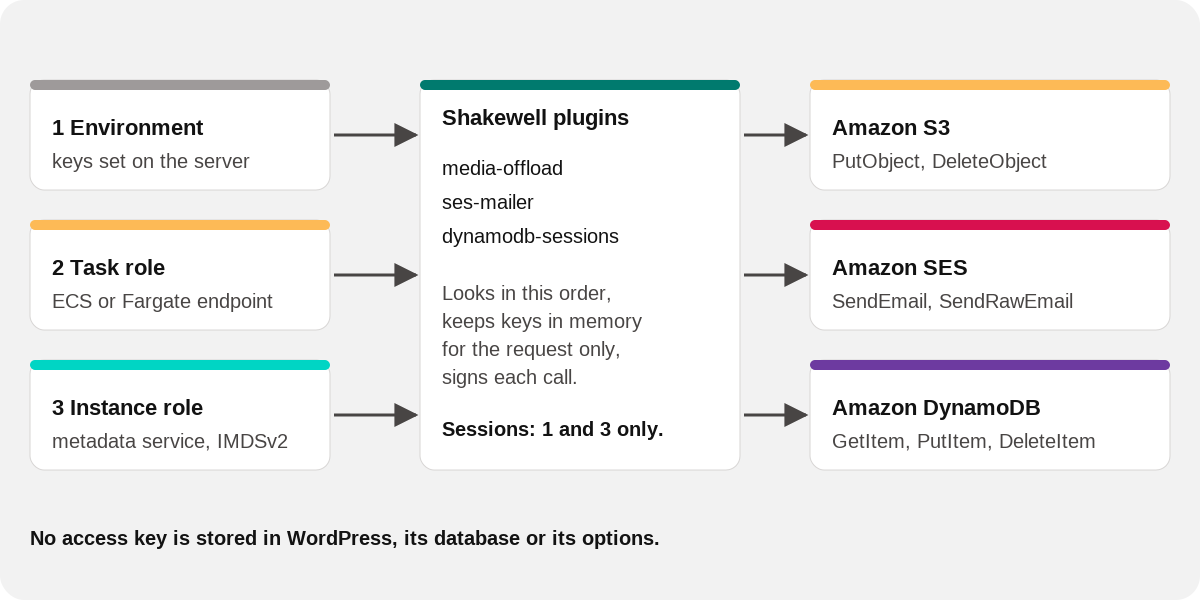
Per their readmes, shakewell-media-offload and shakewell-ses-mailer look for credentials in this order and keep them in memory for the request only:
- Environment variables.
AWS_ACCESS_KEY_ID,AWS_SECRET_ACCESS_KEYand optionallyAWS_SESSION_TOKENin the server environment, not in WordPress. - The container credentials endpoint used by Amazon ECS and AWS Fargate, from
AWS_CONTAINER_CREDENTIALS_RELATIVE_URIorAWS_CONTAINER_CREDENTIALS_FULL_URI. - The EC2 instance role, through the instance metadata service with IMDSv2 (token first).
Keys are never stored in the database or logged, calls to the credential services never go through an HTTP proxy configured for WordPress, and nothing follows a redirect.
shakewell-dynamodb-sessions is narrower. It uses the environment keys if present, which its readme describes as for local development, otherwise the EC2 instance role through IMDSv2. It does not support AWS_CONTAINER_CREDENTIALS_*, web identity or shared credential files.
What AWS says about each source
- ECS and Fargate. AWS documents that ECS sets
AWS_CONTAINER_CREDENTIALS_RELATIVE_URIwhen a task has a task role, appended to the fixed address169.254.170.2. On Fargate, EC2 instance profiles are not available to containers, so a task role is how the container gets credentials. With PHP-FPM, the ses-mailer readme adds a practical step: setclear_env = noin the pool configuration, or pass the variable on explicitly, so PHP can see it. - EC2. Attach an instance profile. The IMDSv2 response hop limit is set at launch, by the account default or by the AMI. AWS warns that a hop limit of 1 can cause issues in a container environment. The readme agrees: 1 is fine for PHP running directly on the instance, and 2 is needed if PHP runs in a container on it.
The IAM policy each plugin needs
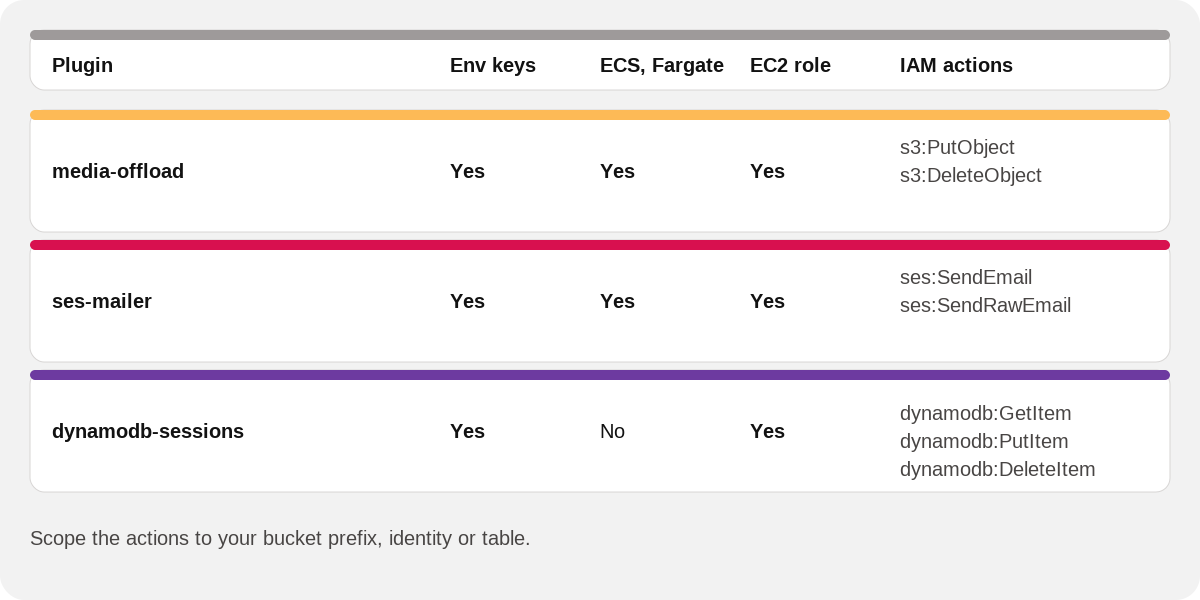
| Plugin | Version | Actions | Scope |
|---|---|---|---|
| shakewell-media-offload | 0.1.1 | s3:PutObject, s3:DeleteObject |
The upload prefix of the bucket |
| shakewell-ses-mailer | 0.1.1 | ses:SendEmail, ses:SendRawEmail |
*, or your verified identity ARN |
| shakewell-dynamodb-sessions | 0.1.0 | dynamodb:GetItem, dynamodb:PutItem, dynamodb:DeleteItem |
The sessions table |
We checked the action names against AWS’s service authorisation reference for S3 and DynamoDB, and SES against its identity and access documentation.
shakewell-media-offload: S3 and CloudFront
The plugin does four things. It sends the original and every size of an upload to your S3 bucket, rewrites attachment, image, srcset and post-content addresses to your CloudFront or S3 address, deletes an attachment’s own objects when you delete the attachment in WordPress, and provides two WP-CLI commands, urls and compare, to prove no media address changed when you switched from another offload plugin. It needs WordPress 6.8 or later.
Configuration is constants or environment variables, ending with SHAKEWELL_MEDIA_OFFLOAD_ENABLED: BUCKET, REGION, PREFIX (default wp-content/uploads/) and DELIVERY_DOMAIN. The policy from the readme:
{
  "Version": "2012-10-17",
  "Statement": [
    {
      "Effect": "Allow",
      "Action": ["s3:PutObject", "s3:DeleteObject"],
      "Resource": "arn:aws:s3:::BUCKET/wp-content/uploads/*"
    }
  ]
}
For a private bucket behind CloudFront, keep “Block all public access” on, create a distribution with Origin Access Control and signing turned on, and add a bucket policy that lets only that distribution read. AWS documents the pattern: the principal is the CloudFront service, the action is s3:GetObject, and a condition matches the distribution’s ARN. Note that the WordPress role writes and deletes, while CloudFront reads. They are separate permissions.
What it does not do. No private media with signed, expiring URLs, no other storage providers, no bulk “offload my whole library” tool, no removal of local copies, and no image optimisation. It never removes files from your server. Files over 100 MB by default stay on the server. When you delete the plugin, it keeps its address table on purpose, because dropping it would turn offloaded files back into server addresses. Failures are logged as one line with the action, stage and status, never file names, keys or credentials.
shakewell-ses-mailer: Amazon SES
WordPress hands every email to wp_mail(). The plugin keeps that function as it is (HTML and plain bodies, attachments, CC, BCC, Reply-To, headers and the wp_mail_failed action) and replaces only the last step: the finished message goes to the Amazon SES v2 API in one signed HTTPS request. It needs WordPress 6.8 or later.
Configuration is constants. SHAKEWELL_SES_MAILER_ENABLED turns it on, and SHAKEWELL_SES_MAILER_REGION sets the region, or the AWS_REGION or AWS_DEFAULT_REGION environment variable is used. There is no built-in default region. Optional constants set a configuration set, From address, From name and Reply-To. The minimal policy:
{ "Version": "2012-10-17", "Statement": [ { "Effect": "Allow", "Action": [ "ses:SendEmail", "ses:SendRawEmail" ], "Resource": "*" } ] }Narrow Resource to your verified identity ARN, arn:aws:ses:REGION:ACCOUNT:identity/example.com, if you prefer. AWS documents that setting Resource to * allows sending from any identity in the account, and that listing identity ARNs restricts it. Before this works you must verify your sending domain or address in SES and, to send to unverified recipients, move the account out of the SES sandbox.
What it does not do. No settings screen, no email log, no queue, no retry, no AWS SDK and no tracking. A failed send returns false from wp_mail(), fires wp_mail_failed and writes one line to the PHP error log naming the stage, HTTP status and error type, never a recipient, subject or body. Email is sent during the request that called wp_mail(), so a slow SES adds up to 10 seconds to it (2 seconds per credential lookup). If another plugin already replaces wp_mail(), deactivate it first, because only one can own it.
shakewell-dynamodb-sessions: shared PHP sessions
Behind a load balancer, PHP sessions on local disk break: the next request lands on a server that has never heard of you. The plugin registers a PHP session handler that keeps each session in one DynamoDB item with an id partition key, a binary data attribute and an expires time in epoch seconds. It has no AWS SDK and needs the PHP curl extension.
Set the table with SHAKEWELL_DYNAMODB_SESSIONS_TABLE, plus a region (_REGION or AWS_REGION); _TTL defaults to 86400 seconds and _ENDPOINT allows DynamoDB Local. Enable the table’s TTL on the expires attribute, and install the plugin folder but do not activate it. Copy mu-loader.php to /wp-content/mu-plugins/000-shakewell-dynamodb-sessions.php, because the handler must register before anything calls session_start().
The role needs dynamodb:GetItem, dynamodb:PutItem and dynamodb:DeleteItem on the table, and on-demand capacity is enough. AWS says expired items are typically deleted within a few days of expiry and can still appear in reads until then. The handler ignores any item whose expires has passed.
What it does not do. No session locking: two simultaneous requests for one session can overwrite each other, and the last write wins. No ECS, EKS web identity or shared-file credentials, as covered above. If DynamoDB is unreachable or credentials fail, the site does not stop: the first failure is logged and the rest of that request uses PHP’s file handler, so sessions become per server until DynamoDB returns. Each failing request can wait up to three seconds on the network. Session data can contain personal data, so restrict the table to the application role.
Where to go from here
On ECS or Fargate, the S3 and SES plugins fit, and for sessions you would need another store. On EC2 all three fit. If you run WordPress on AWS with us, our AWS partner page and WordPress development work cover the surrounding hosting, and a maintenance plan should include a look at the IAM policies as well as plugin updates.
Sources: the readme.txt and README.md of the three plugin repositories, read on 29 November 2026; AWS documentation on security credentials and temporary credentials, ECS task roles and environment variables, ECS task IAM roles, DynamoDB time to live, IMDS options, restricting access to an S3 origin and SES access control, checked the same day. Amazon, AWS, Amazon S3, Amazon SES, Amazon CloudFront and Amazon DynamoDB are trademarks of Amazon.com, Inc. or its affiliates. These plugins are not affiliated with, endorsed by or sponsored by Amazon.
Common questions
How do I offload WordPress media to S3 without storing an access key?
Give the server an IAM role (an instance profile on EC2, or a task role on ECS or Fargate) and use a plugin that reads that role's temporary credentials. Our shakewell-media-offload plugin does this. It needs only s3:PutObject and s3:DeleteObject on the upload prefix of the bucket.
Can WordPress send email through Amazon SES using an IAM role?
Yes. shakewell-ses-mailer sends wp_mail() through the SES v2 API using the server's own credentials, so no key is pasted into the dashboard. The policy needs ses:SendEmail and ses:SendRawEmail, and you must verify your sending domain or address in SES first.
Does the DynamoDB sessions plugin work on ECS or Fargate?
Not with a task role. Its readme says it supports only environment keys and the EC2 instance role. It does not read the ECS container credentials, EKS web identity or shared credential files. On Fargate it would need environment keys, which defeats the purpose, so use it on EC2 or choose another session store.
Is an IAM role really safer than an access key in wp-config.php?
AWS recommends temporary credentials from IAM roles over long-term access keys, which stay valid until someone revokes them. A key in wp-config.php or the database can leak through backups, repositories, exports or a compromised plugin. A role removes that file from the risk, though a compromised server can still use the role while it runs.
Are these plugins production-ready?
They are early 0.x releases: media-offload 0.1.1, ses-mailer 0.1.1 and dynamodb-sessions 0.1.0. Each readme states what it does not do. Test on staging, with a deliberately narrow IAM policy, before you switch them on.